
Snap-to-Size Template
Select your product options above to instantly download the matching setup template:
Select a Size above to generate your download...
Step 1
Ensure artwork is CMYK 300 dpi with 1/8 inch (0.125") bleeds.
Step 2
Embed high-resolution images and outline all text (convert to curves).
Step 3
Delete setup guide layers and export into print-ready PDF format.
View All Templates Library
Click to browse every available size template for this product
Size: 1 x 1
Size: 1 x 2
Size: 1 x 3
Size: 1.5 x 1.5
Size: 1.5 x 2
Size: 1.5 x 2.5
Size: 1.5 x 3
Size: 1.5 x 3.5
Size: 2 x 1.5
Size: 2 x 2
Size: 2 x 3
Size: 2 x 5
Size: 2 x 6
Size: 2.0625 x 1.5
Size: 2.5 x 1.5
Size: 2.5 x 2.5
Size: 2.5 x 3
Size: 2.5 x 3.5
Size: 2.5 x 4
Size: 2.25 x 0.75
Size: 2.75 x 1.875
Size: 2.875 x 2.375
Size: 3 x 1
Size: 3 x 1.5
Size: 3 x 2
Size: 3 x 3
Size: 3 x 4
Size: 3 x 5
Size: 3 x 5.5
Size: 3.5 x 1
Size: 3.5 x 2
Size: 3.5 x 3.5
Size: 3.5 x 4
Size: 3.25 x 1.0625
Size: 3.25 x 2.25
Size: 3.25 x 4.875
Size: 3.125 x 1
Size: 3.375 x 1.75
Size: 3.625 x 1.75
Size: 3.3125 x 1
Size: 4 x 2
Size: 4 x 3
Size: 4 x 4
Size: 4.25 x 2.5
Size: Standard Sizes
1 Inch Cir Rolllabel (PDF)1.5 Inch Cir Rolllabel (PDF)1.25.20inch Cir Rolllabel (PDF)1.75.20inch Cir Rolllabel (PDF)1.125.20inch Cir Rolllabel (PDF)1.1875.20inch Cir Rolllabel (PDF)1.9375.20inch Cir Rolllabel (PDF)2.5 20inch Cir Rolllabel (PDF)2.20inch Cir Rolllabel (PDF)2.25.20inch Cir Rolllabel (PDF)2.75.20inch Cir Rolllabel (PDF)2.625.20inch Cir Rolllabel (PDF)3.5 20inch Cir Rolllabel (PDF)3.20inch Cir Rolllabel (PDF)3.25.20inch Cir Rolllabel (PDF)3.75.20inch Cir Rolllabel (PDF)3.125.20inch Cir Rolllabel (PDF)3.625.20inch Cir Rolllabel (PDF)4.20inch Cir Rolllabel (PDF)
File Orientation Guide
How to set up proper orientation for your files
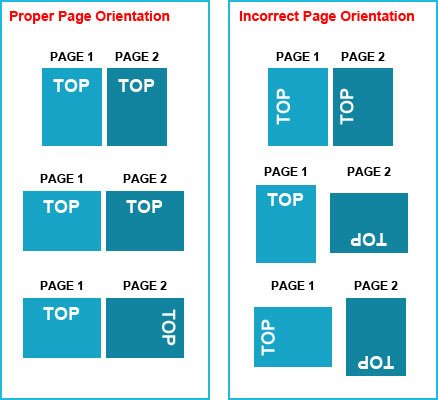
File Orientation refers to the orientation of the artwork files submitted. Ensure that they are submitted to back up properly to produce the intended result.
Flat Artwork (Postcards, Flyers etc.)
General File Preparation Guidelines
Learn how to set up your files the right way
- Download our guides to ensure a more optimal print result.
- Be sure to DELETE any hidden layers that are not intended to print (ie: setup guide layers or other hidden artwork layers) to ensure no risk of them appearing on the final print.
- For 1-Sided (4/0) products, upload 1 PDF file (Front). For 2-Sided (4/4) products, upload 2 separate PDF files (1. Front PDF, 2. Back PDF).
- Files must be submitted with proper orientation to ensure proper back up.
- Avoid using thin borders too close to the trim line.
- File must include 1/8" bleed and all important art and text must be within the safety margin.
- Ensure that your PDF is high res and that all images are CMYK at 300 DPI.
- Black text/type should be C0, M0, Y0, K100. Large rich black areas should be C30, M20, Y20, K100.
- Embed or outline all fonts.